

Leveraging Haven to operationalize HOP and Learning Teams
Human and Organizational Performance, commonly referred to as HOP, is a safety philosophy focused on understanding how work actually happens, how systems shape behavior, and how organizations can learn before, during, and after failure.
HOP shifts the conversation away from asking “who failed?” and toward better questions:
- What made the decision or action make sense at the time?
- What conditions shaped the work?
- Where did the system depend on adaptation, workaround, or heroics?
- What controls were missing, weak, hard to use, or unavailable?
- How can the organization make successful performance more likely next time?
A few practical characteristics define HOP in the field:
- It treats people as problem solvers, not problems to be fixed.
- It recognizes that error is normal and that systems should be designed to anticipate and absorb human variability.
- It focuses on context, conditions, controls, and organizational response.
- It values learning from normal work, weak signals, near misses, and operational adaptations, not only from serious incidents.
- It uses Learning Teams and other collaborative methods to understand “work as done” from the people closest to the work.
HOP is not a replacement for investigation methods, corrective action programs, or regulatory requirements. It is the operating philosophy that changes how safety teams interpret events, engage frontline workers, and decide what improvement should look like.
The opportunity is clear: HOP gives safety organizations a better way to learn. Haven gives them a way to operationalize that learning at scale.
How Haven supports HOP-driven safety organizations
You can leverage Haven inside a HOP-driven safety organization by treating HOP as the learning philosophy and Haven as the execution layer that captures frontline insight, structures sensemaking, connects evidence, identifies systemic patterns, and converts learning into stronger controls.
Below is a practical mapping that keeps HOP intact while improving consistency, speed, quality, and follow-through.
Step 1: Capture work as done, not just work as imagined
HOP intent: Understand how work actually happens in the field, including the gap between procedures, plans, expectations, and operational reality.
How Haven helps
- Haven guides structured witness and worker conversations using adaptive questioning that responds to the context of the event, task, role, and environment.
- Haven captures the details that often get lost in traditional reporting: local constraints, competing goals, degraded equipment, staffing gaps, time pressure, unclear handoffs, informal norms, and necessary workarounds.
- Haven ingests photographs, documents, audio, forms, procedures, permits, job plans, and other operational records into one investigation workflow.
- Haven reconstructs timelines around facts, conditions, decision points, and control states, not just final outcomes.
Output artifacts: work-as-done summary, timeline, evidence register, interview summaries, local condition map, procedure-to-practice gap list.
Practical HOP benefit: safety teams get a clearer view of operational reality before jumping into conclusions, labels, or corrective actions.
Step 2: Ask better questions after an event
HOP intent: Replace blame-oriented questions with learning-oriented questions that reveal context and system conditions.
How Haven helps
- Haven helps investigators frame actions as decisions made under specific conditions.
- Haven prompts for the information needed to understand why an action made sense at the time.
- Haven flags thin explanations such as “human error,” “complacency,” “lack of attention,” or “procedure not followed” and pushes the analysis toward deeper contributing conditions.
- Haven identifies missing evidence, unresolved contradictions, and assumptions that should be validated before a finding is approved.
Output artifacts: decision-point analysis, open question list, missing evidence list, assumption register, contributing condition hypotheses.
Practical HOP benefit: the investigation stays focused on learning how the system shaped behavior, rather than stopping at the behavior itself.
Step 3: Identify system conditions and control weaknesses
HOP intent: Move from individual actions to the conditions that influenced those actions and the controls that should have prevented or reduced exposure.
How Haven helps
- Haven links actions, conditions, hazards, controls, and failure modes across the event timeline.
- Haven maps evidence to control layers, including engineering controls, administrative controls, verification steps, supervision practices, maintenance systems, planning processes, and organizational governance.
- Haven identifies where controls were absent, degraded, bypassed, misunderstood, impractical, unavailable, or overly dependent on individual vigilance.
- Haven supports multi-threaded analysis so teams can explore several causal pathways in parallel instead of forcing a single linear explanation.
Output artifacts: control map, degraded control inventory, system condition list, causal pathway analysis, risk exposure summary.
Practical HOP benefit: teams can see where the system allowed normal variability to become hazardous.
Step 4: Turn Learning Teams into a repeatable operating system
HOP intent: Create a structured, psychologically safer way for the people who do the work to explain how the work really happens, where the system is brittle, and what would make success more likely.
Learning Teams are one of the most practical ways to operationalize HOP. They bring together frontline workers, supervisors, safety professionals, engineers, maintenance, operations, and other stakeholders to learn from real work. The goal is not to conduct a courtroom-style investigation. The goal is to understand the system.
Haven can support Learning Teams before, during, and after the session.
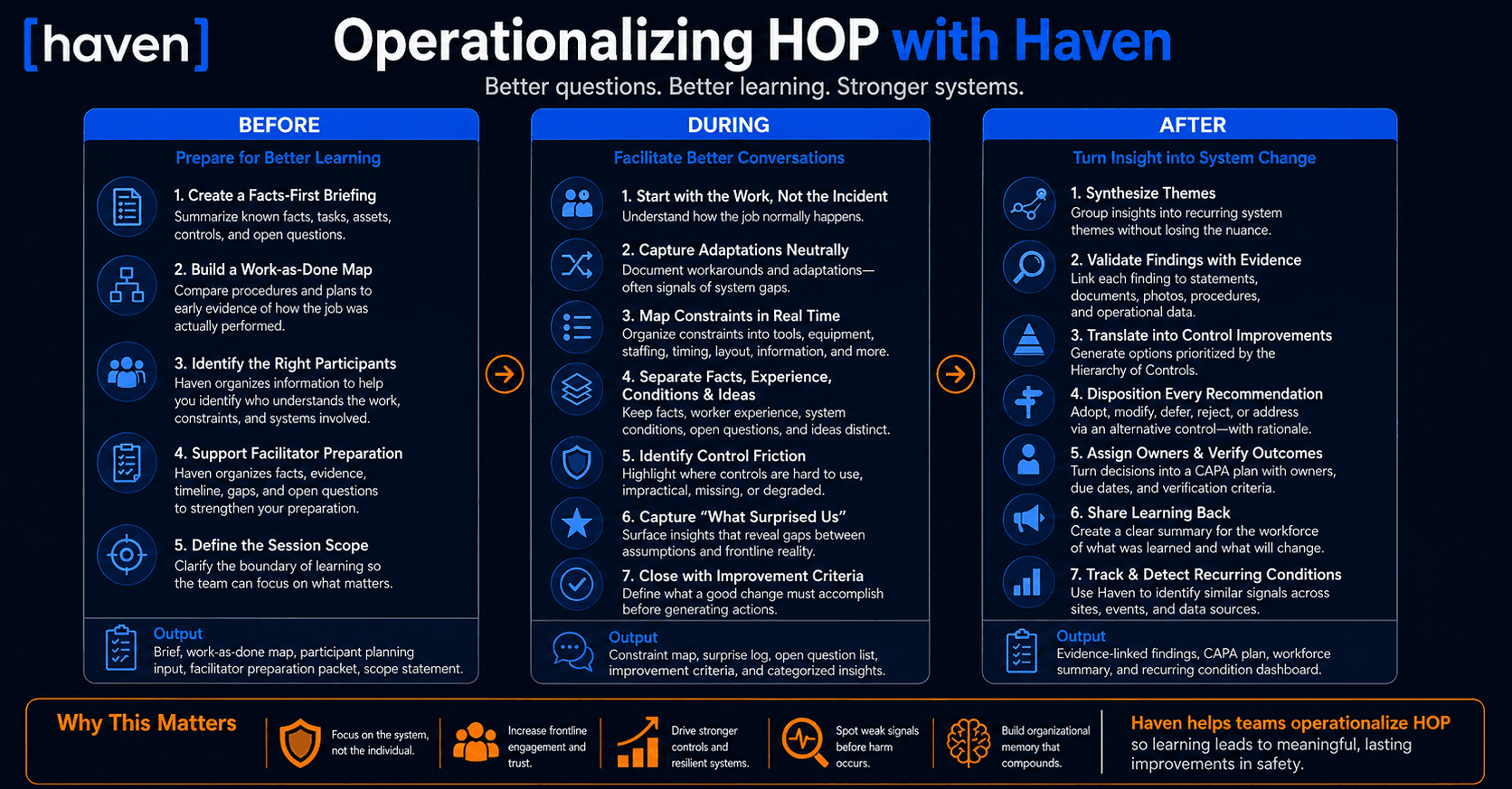
Before the Learning Team: prepare the team for better learning
A strong Learning Team begins before the meeting. The facilitator needs enough context to ask useful questions, but not so much interpretation that the session becomes biased.
How to use Haven before the session
- Create a facts-first briefing
Use Haven to summarize the known facts, sequence of events, involved tasks, assets, controls, documents, and open questions. Keep the briefing descriptive. Do not enter the Learning Team with final causes already written.
Output: one-page Learning Team brief. - Build a preliminary work-as-done map
Use Haven to compare procedures, permits, job plans, and training materials against the early evidence of how the job was actually performed.
Output: work-as-imagined versus work-as-done starter map. - Identify the right participants
Haven does not decide who should be in the room, but the information it organizes can help facilitators make that decision. By clarifying the task, sequence of events, involved assets, documents, roles, and open questions, Haven helps the facilitator identify which people are likely to understand the work, the constraints, and the systems surrounding the event.
Output: participant planning input by task, role, asset, and knowledge area. - Support better facilitator preparation
Haven does not replace the judgment of a skilled facilitator. But by organizing the facts, evidence, timeline, procedure gaps, and unresolved questions before the session, Haven gives the facilitator a stronger foundation for preparing a learning-oriented discussion.
Output: facilitator preparation packet. - Define the session boundary
Clarify what the Learning Team is trying to understand. A tight scope creates better learning. Examples include “loading dock congestion during peak shift change,” “permit handoff between maintenance and operations,” or “why the isolation verification step is difficult to complete in practice.”
Output: Learning Team scope statement.
Practical HOP benefit: the session begins with evidence, context, and curiosity, not speculation or blame.
During the Learning Team: structure the conversation without controlling it
The best Learning Teams are structured enough to produce useful learning, but open enough to let frontline reality emerge. Haven helps facilitators keep track of the conversation, capture insights, and identify gaps without turning the session into a checklist exercise.
How to use Haven during the session
- Start with the work, not the incident
Use Haven’s pre-session work map to ask participants to describe how the task normally happens on a good day. Then compare that to the day of the event or the condition being studied.
Facilitator prompt: “Walk us through how this job usually gets done, from the moment the work is assigned to the moment it is complete.” - Capture adaptations and workarounds neutrally
Use Haven to document adaptations without labeling them as violations. Many adaptations are signs that workers are successfully managing system gaps.
Facilitator prompt: “Where do people have to adjust the plan to get the work done?” - Map constraints in real time
As participants describe the work, use Haven to organize constraints into categories such as tools, equipment, staffing, timing, layout, information, procedures, supervision, and more.
Output: live constraint map. - Separate facts, interpretations, and improvement ideas
Learning Teams often move quickly from “what happened” to “what we should do.” Haven helps keep these threads distinct.
Output categories: - Identify control friction
A critical HOP question is not only whether a control existed, but whether it was usable under real conditions. Haven helps document where controls were too slow, confusing, unavailable, poorly timed, physically impractical, or misaligned with production realities.
Facilitator prompt: “Which controls are hardest to use when the job is under pressure?” - Capture “what surprised us” moments
The most valuable learning often comes from surprise. Haven can help facilitators tag insights that reveal a gap between leadership assumptions and frontline reality.
Output: surprise log. - Close with improvement criteria
Before generating actions, use Haven to help the group define what a good improvement must accomplish. This prevents defaulting to training, reminders, or procedure edits.
Facilitator prompt: “What change would make the right action easier and the risky action harder?”
Practical HOP benefit: Learning Teams produce structured, usable insights while preserving the voice and expertise of the people closest to the work.
After the Learning Team: convert insight into system improvement
A Learning Team only creates value if its insights become action. This is where many organizations struggle. Notes are captured, themes are discussed, and then the same conditions reappear somewhere else.
How to use Haven after the session
- Synthesize themes without flattening the nuance
Use Haven to group insights into recurring system themes while preserving the specific examples and worker language that made the learning meaningful.
Output: Learning Team synthesis. - Validate findings against evidence
Use Haven to connect each proposed finding to evidence from statements, documents, photos, procedures, maintenance records, or operational data.
Output: evidence-linked finding set. - Translate insights into control improvements
Use Haven to generate improvement options that prioritize stronger controls. The goal is to move beyond “tell people to be careful” and toward changes that reduce exposure, simplify the task, improve recoverability, or make success more reliable.
Output: improvement option set mapped to the Hierarchy of Controls. - Disposition every recommendation
Each recommendation should be adopted, adopted with modification, rejected with rationale, deferred with a time-bound review, or addressed through an alternative control.
Output: recommendation disposition log. - Assign owners and verification methods
HOP-driven improvement still needs disciplined execution. Every approved action needs an owner, due date, verification method, and effectiveness measure.
Output: CAPA plan with verification criteria. - Share learning back to the workforce
Use Haven to draft a short, practical learning summary for the people affected by the change. The summary should explain what was learned, what will change, who owns the change, and how the organization will know whether it worked.
Output: workforce learning bulletin. - Track whether the condition recurs
Use Haven to detect whether similar conditions appear in future reports, observations, near misses, audits, or investigations across other sites.
Output: recurring condition dashboard.
Practical HOP benefit: Learning Teams become a closed-loop improvement system, not a one-time conversation.
Step 5: Improve corrective actions without defaulting to “train and remind”
HOP intent: Create changes that improve the system, strengthen controls, and make successful performance more likely.
How Haven helps
- Haven generates corrective and preventive action options linked to the actual conditions and controls identified during the investigation or Learning Team.
- Haven prioritizes recommendations grounded in the Hierarchy of Controls, including elimination, substitution, engineering controls, and workflow redesign.
- Haven scores action options by expected risk reduction, implementation effort, and feasibility.
- Haven helps safety leaders compare options, select the most effective path, and document why alternatives were accepted, modified, deferred, or rejected.
Output artifacts: CAPA set, action ranking, control improvement plan, verification plan, effectiveness criteria.
Practical HOP benefit: corrective actions become stronger, more defensible, and less dependent on individual memory or vigilance.
Step 6: Learn from normal work and weak signals
HOP intent: Learn before serious harm occurs by paying attention to everyday operational signals.
Many organizations only investigate deeply after a serious incident. A HOP-driven organization learns from normal work, low-severity events, near misses, good catches, operational friction, and repeated small deviations.
How Haven helps
- Haven helps teams analyze signals captured through incident reports, near misses, witness statements, investigation materials, corrective actions, and other evidence brought into the Haven workflow.
- Haven identifies recurring conditions that may look minor locally but significant across the enterprise.
- Haven detects patterns related to SIF precursors, control degradation, documentation gaps, recurring task friction, and cross-site variability.
- Haven helps leaders see where the organization is relying on adaptation instead of resilient design.
Output artifacts: weak signal dashboard, SIF precursor themes, cross-site condition clusters, early warning reports.
Practical HOP benefit: the organization can intervene on system vulnerability before it becomes a serious event.
Step 7: Build organizational memory
HOP intent: Make learning durable, searchable, and reusable across teams, sites, and time.
A common failure mode in safety management is relearning the same lesson repeatedly. One site learns something important, but another site experiences the same condition months later. One investigation identifies a brittle control, but that insight stays trapped in a report. One Learning Team reveals a procedure gap, but the lesson does not reach engineering, procurement, training, planning, or leadership.
How Haven helps
- Haven preserves evidence, findings, Learning Team outputs, CAPA decisions, and verification results in a structured record.
- Haven links new investigations and Learning Teams to similar prior events, conditions, controls, and corrective actions.
- Haven helps teams understand whether a proposed action has worked before, failed before, or appeared in a different operational context.
- Haven creates a searchable learning system that supports both site-level improvement and enterprise-level risk strategy.
Output artifacts: institutional learning record, recurring theme library, similar event analysis, prior CAPA effectiveness review.
Practical HOP benefit: learning compounds over time instead of resetting with every event.
Step 8: Keep humans in control of safety decisions
HOP intent: Preserve trust, judgment, and accountability in high-consequence safety work.
AI should not replace professional judgment, assign blame, or finalize findings. In a HOP-driven organization, that principle is even more important. The goal is not to automate conclusions. The goal is to improve the quality of human learning and decision-making.
How Haven helps
- Haven separates drafts, hypotheses, evidence, approved findings, and final corrective actions.
- Haven keeps outputs traceable to the underlying record.
- Haven supports review and approval workflows so safety professionals remain accountable for final decisions.
- Haven provides structure without removing the need for facilitation, judgment, worker engagement, and leadership ownership.
Output artifacts: draft analysis, evidence links, approval record, final finding set, CAPA governance record.
Practical HOP benefit: AI strengthens the learning process without becoming the decision-maker.
Conclusion: Haven helps HOP become operational
HOP gives organizations a powerful way to think about safety. It changes the quality of questions, the quality of engagement, and the quality of learning.
But HOP also creates an execution challenge.
To operationalize HOP, safety teams need consistent evidence capture, better frontline listening, structured Learning Teams, traceable analysis, stronger corrective actions, enterprise pattern detection, and disciplined follow-through.
This is where Haven materially strengthens the workflow.
The biggest step changes of using Haven inside a HOP-driven safety organization are:
- Better capture of work-as-done context
- More consistent HOP-aligned questioning
- Stronger Learning Team preparation, facilitation, synthesis, and follow-through
- Less reliance on shallow labels like “human error”
- Clearer links between conditions, controls, and improvement actions
- Stronger corrective actions aligned to the Hierarchy of Controls
- Better visibility into weak signals and recurring system vulnerabilities
- Durable organizational memory across sites and time
HOP is a philosophy for learning and improvement.
Haven helps safety organizations put that philosophy to work.